
Mastering the Art of Standing Desk Cable Management
The Real Reason Your Standing Desk Cables Keep Getting Tangled
Standing desk cable management is the process of organizing, routing, and securing the cables connected to your height-adjustable desk so they move freely when you raise or lower it — without pulling, snagging, or creating a tangled mess.
Here’s a quick overview of what works:
- Mount a cable tray under your desktop to hold your power strip and adapters off the floor
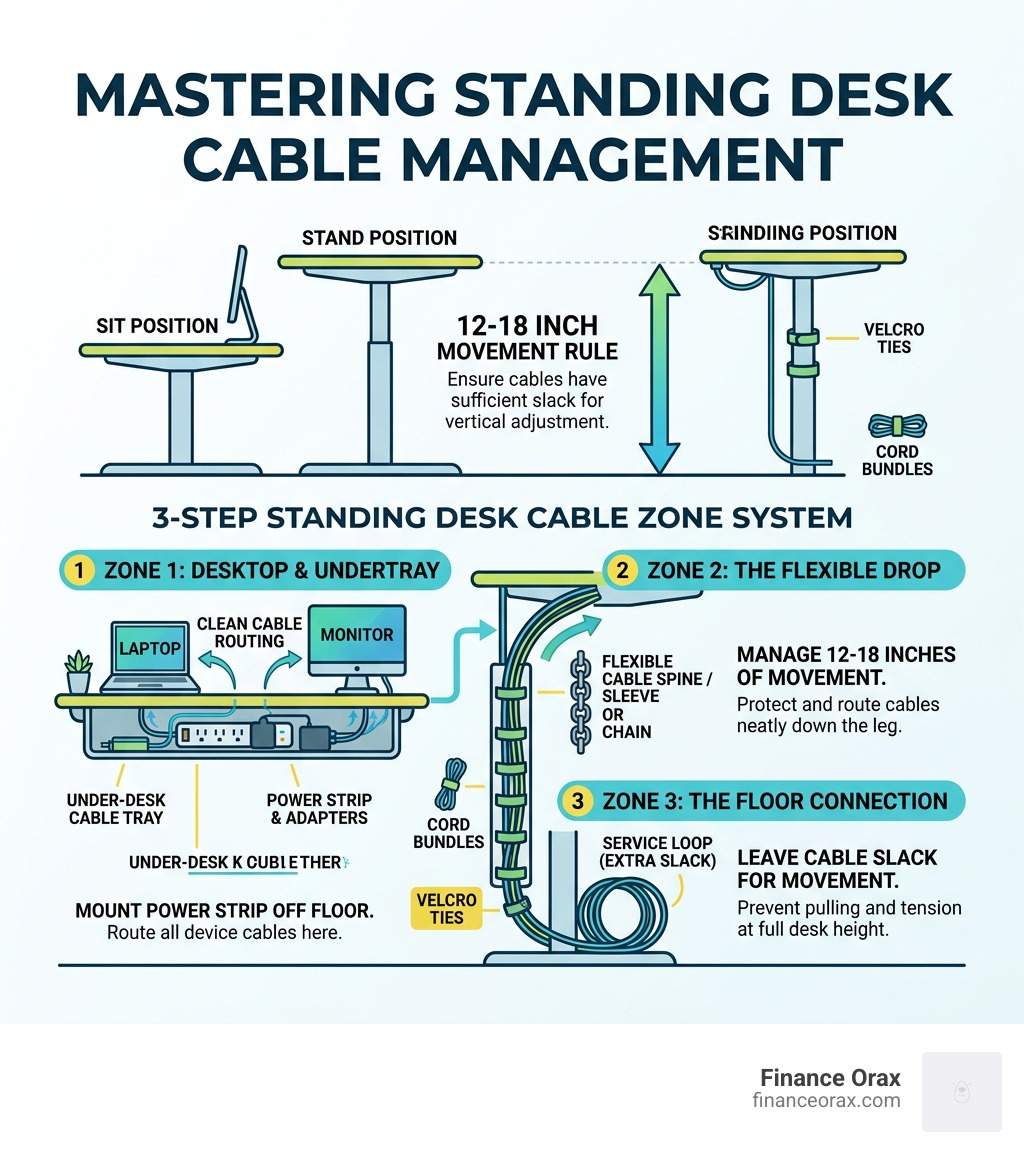
- Use a cable chain or spine along the desk leg to handle the 12-18 inches of vertical movement
- Bundle cables with Velcro ties (not zip ties) at regular intervals, grouped by function
- Leave a service loop — extra cable slack — so nothing pulls tight at full desk height
- Conceal the vertical drop with a cable sleeve from the desk leg down to the floor
Picture this: you sit down to start your workday, and before you’ve even opened your laptop, you’re already annoyed. There’s a tangle of cables hanging under your desk, the power strip is dangling awkwardly, and every time you raise the desk to stand, something snags.
It’s a frustratingly common problem — and it’s worse on standing desks than on regular ones.
Here’s why: a standard desk sits still. A standing desk moves 12 to 18 inches every time you adjust the height. That constant vertical travel yanks cables that are tied too tight, pulls adapters off shelves, and slowly damages connectors through repetitive mechanical stress. Solutions that work perfectly on a fixed desk simply fail here.
Beyond the daily frustration, a messy cable setup has real costs. Visual clutter competes for your attention and ads to your cognitive load throughout the day. Loose cables on the floor create tripping hazards. And cables that repeatedly pull taut will eventually break — taking your equipment with them.
The good news? This is a solvable problem. With the right system — not just a few zip ties — you can have a clean, functional desk that adjusts smoothly at any height.
Why Standing Desk Cable Management is Essential for Your Routine
At Finance Orax, we believe that your physical environment is the foundation of your daily routine. In April 2026, as remote work and hybrid setups have become more sophisticated, we’ve realized that standing desk cable management isn’t just a vanity project—it’s a productivity essential.
When your cables are a “rat’s nest,” your brain feels it. Research into workspace design shows that visual clutter competes for our cognitive resources, making it harder to focus. Beyond the mental aspect, there are practical, mechanical reasons to get organized:
- Equipment Protection: Every time you raise your desk, you risk yanking a monitor off its stand or snapping a delicate USB-C port if the cables don’t have enough slack.
- Safety First: Cables pooling on the floor are a magnet for chair wheels, pets, and wandering feet. Tripping hazards are the enemy of a peaceful home office.
- Longevity of Gear: Repetitive mechanical stress on cable insulation leads to fraying. A proper setup ensures your expensive tech lasts as long as possible.
- Ergonomic Movement: If you’re afraid to raise your desk because of the “cable pull,” you won’t use the standing feature you paid for. Proper management gives you the confidence to move.

The Three-Zone Strategy for Organization
To truly master standing desk cable management, we recommend a “Three-Zone Strategy.” This systematic approach ensures every inch of wire is accounted for, from the monitor on your desk to the outlet in the wall.
- The Horizontal Zone (Under-Desk): This is where the magic happens. By mounting a tray or basket to the underside of the desktop, you move the “brain” of your power system—the surge protector—off the floor and onto the desk itself.
- The Vertical Zone (The Bridge): This handles the 12-18 inches of travel. This is where you use a vertebrae chain or an articulating spine to guide cables safely from the moving desk to the stationary floor.
- The Containment Zone (The Surface): This involves managing the cables that stay on top of the desk, such as your keyboard, mouse, and monitor wires, using clips and desk grommets.
Essential Components of Standing Desk Cable Management
Choosing the right hardware depends on your budget and your desk type. Here is a breakdown of the components we see dominating the market in 2026:
- Cable Management Trays: These range from basic wire mesh baskets (approx. $20) to premium solid steel trays ($80-$130). Many suppliers offer tiered kits, including basic, advanced, and professional-grade options.
- Vertebrae Chains/Spines: These are segmented plastic “spines” that snap together. They protect the vertical run and look incredibly professional. A high-quality spine usually costs between $15 and $75.
- Magnetic Channels: If your desk has steel legs, magnetic channels are a “no-drill” dream. They snap onto the leg and hide cables inside a sleek metal or plastic shroud.
- No-Drill/Clamp-On Racks: Perfect for glass desks or those who don’t want to put screws into their wood. These use a C-clamp to hang the tray off the back edge.
| Feature | Budget Solution (<$20) | Premium Solution (>$100) |
|---|---|---|
| Primary Material | Plastic clips / Mesh baskets | Powder-coated steel / Eco-fabrics |
| Installation | Adhesive or basic screws | Integrated mounting / Clamp-on |
| Capacity | 5-10 lbs of cables | 50+ lbs (e.g., heavy-duty steel boxes) |
| Aesthetics | Visible wires through mesh | Completely hidden / Minimalist |
Step-by-Step Installation Guide
Ready to eliminate the chaos? Follow our Finance Orax guide to a clean setup. We estimate this takes about 30 to 45 minutes of focused work.
1. Map and Label
Unplug everything. Yes, everything. Lay your cables out and label both ends. You’ll thank us later when you need to swap a monitor and don’t have to play “cable detective” under the desk.
2. Mount the Power Strip
The single most important rule: Move the power strip to the desk. Use a mountable surge protector and screw it into the underside of your desktop or place it inside your cable tray. This ensures that when the desk moves, the power source moves with it.
3. Install the Tray
Mount your horizontal tray toward the back of the desk. If you’re using a screw-mount tray, pre-drill pilot holes (1/2 inch max depth!) to prevent the wood from splitting. For more guidance on specific setups, check out these ergonomic workspace tips.
4. Bundle with the 6-Inch Rule
Use Velcro ties to bundle cables together every 6 inches. Group them by function—power cables in one bundle, data/monitor cables in another. This prevents the “spaghetti effect” inside your tray.
5. Create the Service Loop
This is the secret to standing desk cable management. A service loop is a deliberate loop of extra slack left at the point where the cables transition from the desk to the vertical spine.
6. The Vertical Drop
Route your main power cord (from the surge protector) and any ethernet cables through your cable spine or sleeve. If you’re looking for a sleek, modular option, consider a modular cable organizer designed for daily desk use.
Testing Your Standing Desk Cable Management Range
Before you call it a day, you must perform the “Stress Test.”
- Maximum Height: Raise your desk to its absolute highest setting. Watch the cables closely. Are they pulling taut? Is the power strip being lifted?
- Minimum Height: Lower the desk to its lowest setting. Are the cables pooling on the floor in a way that might get caught in the desk’s legs or motor?
- The 12-18 Inch Rule: Ensure your vertical spine has enough segments to cover the full range of motion. We recommend adding 6-8 inches of extra slack at the floor end to absorb the movement.
Avoiding Common Pitfalls in Your Setup
Even with the best intentions, it’s easy to make mistakes that can damage your gear.
- The Zip Tie Trap: We strongly advise against plastic zip ties. They are permanent, sharp, and can cut into cable insulation over time. Reusable Velcro ties are the gold standard for 2026.
- Over-Tightening: If you bundle cables too tightly, you create heat. Power adapters and cables need a little “breathing room” to dissipate heat, especially if they are tucked into a solid metal box.
- The Single-Sleeve Trap: Don’t try to cram 10 cables into one sleeve. It makes the sleeve stiff and unresponsive to the desk’s movement. If you have a lot of wires, use two separate, smaller sleeves.
- Ignoring the Stationary Anchor: Your cables need to be anchored to the desk (the moving part) and ideally guided to a stationary point on the floor. If the cables are just “flopping” in the middle, they will eventually snag on your chair.
Frequently Asked Questions about Desk Organization
Will drilling for cable trays void my desk warranty?
Generally, no. Most manufacturers expect users to mount accessories. However, never drill into the motor, the control box, or the structural crossbars. Always stick to the wood or laminate desktop. If you’re nervous, opt for a universal clamp-on tray.
How much cable slack is required for a standing desk?
You need enough slack to cover the desk’s maximum height plus an additional 6 to 10 inches. This “service loop” ensures that even at full extension, there is no tension on the plugs or ports.
What are the best no-drill solutions for glass desks?
For glass or very thin desks, avoid screws at all costs. Use clamp-on cable trays or high-quality adhesive channels. Magnetic cable managers are also excellent if your desk has a metal frame, as they require zero tools to install.
Conclusion
Mastering standing desk cable management is more than just an aesthetic choice—it’s a commitment to a better way of working. By following the three-zone strategy and ensuring your setup can handle the dynamic movement of a height-adjustable desk, you protect your equipment and clear your mind for the work that matters.
At Finance Orax, we believe that a holistic approach to your workspace—from the decor you choose to the way you route your wires—is the key to building a daily routine that sticks. A clean desk isn’t just a “nice to have”; it’s a professional environment that fosters focus and health.
Ready to transform your workspace? Build your perfect routine with Finance Orax and discover more tips for a high-performance home office.
