
Ultimate Checklist for Standing Desk Setup
Why Your Standing Desk Setup Can Make or Break Your Workday
A proper standing desk setup can transform how you feel and work — but only if you get the details right. Here’s a quick overview of what it takes:
Quick Setup Checklist:
- Desk height: Adjust so elbows sit at a 90-degree angle, forearms parallel to the floor
- Monitor position: Top edge at or just below eye level, 20–28 inches from your face
- Keyboard and mouse: Wrists neutral and flat, mouse directly beside the keyboard
- Sit-stand routine: Alternate every 30–60 minutes; aim for 2–4 hours of standing per day
- Key accessories: Anti-fatigue mat, monitor arm, supportive footwear
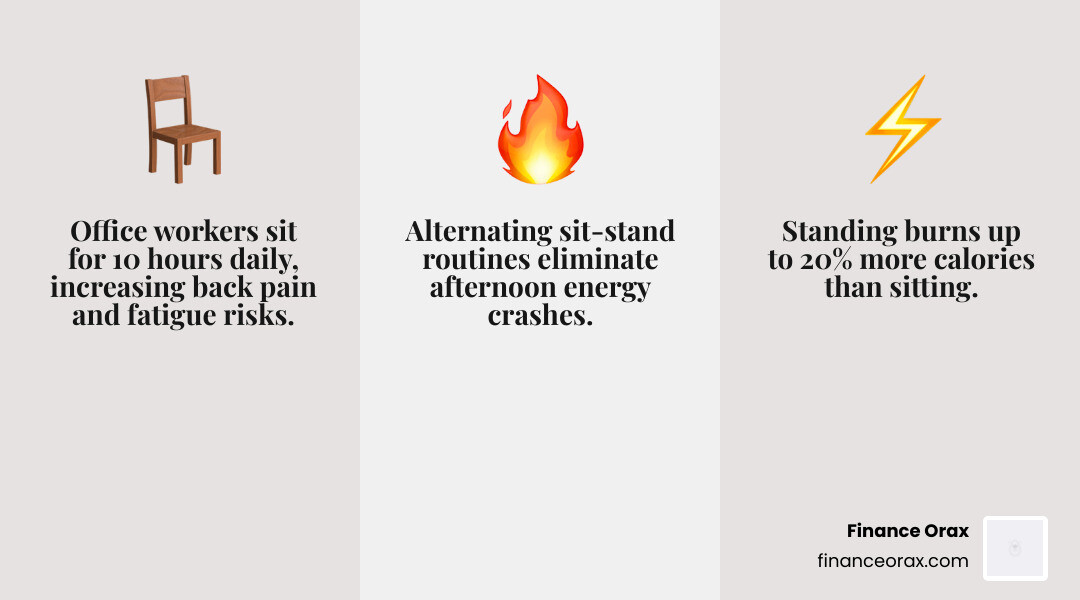
The average office worker sits for roughly 10 hours a day. That much sitting is linked to back pain, sluggish circulation, and the dreaded mid-afternoon energy slump that no amount of coffee seems to fix.
A standing desk helps. Research shows standing burns up to 20% more calories than sitting, and many people find their afternoon energy crashes simply disappear once they build a consistent sit-stand routine.
But here’s the thing — buying a standing desk is just the beginning. A desk set up at the wrong height, with a monitor too low and a keyboard in the wrong position, can actually create new aches instead of solving old ones.
This guide gives you a complete, practical checklist so your setup works for your body, not against it.
The Core Ergonomics of a Standing Desk Setup
Ergonomics isn’t just a corporate buzzword; it’s the science of making your workspace fit your body. When we talk about a standing desk setup, we aren’t just talking about standing still. We are talking about creating a “neutral” body position where your joints are naturally aligned, reducing the strain on your muscles and spine.
The most common mistake people make is treating a standing desk like a podium. They lean, they slouch, or they “perch” on one leg. To get the most out of your desk, you need to think about your body as a series of angles.
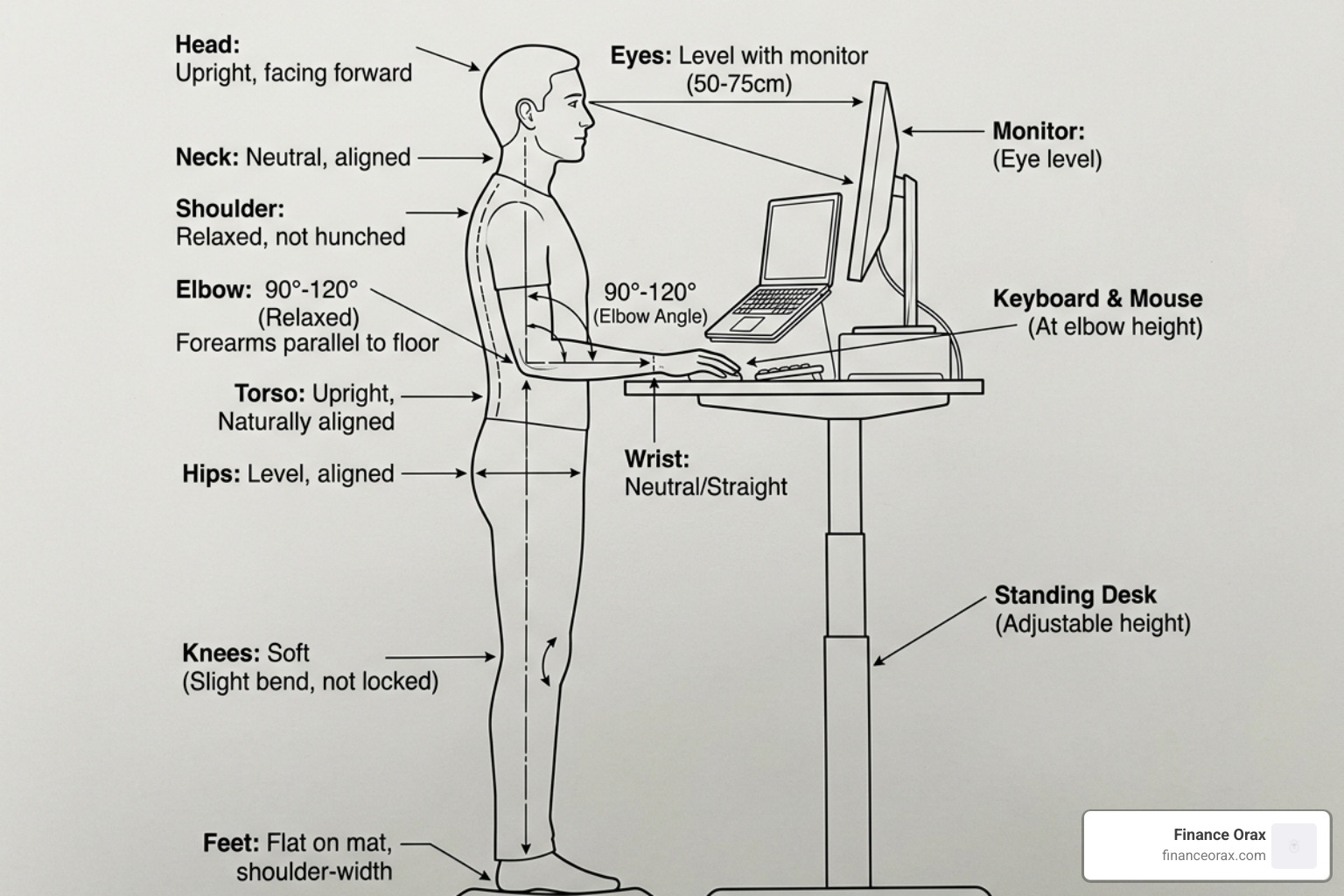
Key Principles of Ergonomic Alignment:
- The Elbow Rule: Your elbows should be bent at a 90 to 120-degree angle. This keeps your forearms parallel to the floor and prevents you from shrugging your shoulders.
- Neutral Wrists: Your wrists should not be cocked up or down. They should float flat over the keyboard. If you feel your wrists bending sharply, your desk is likely too high or too low.
- Shoulder Relaxation: Your shoulders should be down and back, not hunched toward your ears. If you find yourself “tensing up,” it’s often a sign that your desk surface is set too high.
- The “Soft” Knee: Never lock your knees. Keeping a slight, almost invisible bend in your knees helps engage your core and prevents lower back pressure.
- Weight Distribution: Keep your feet hip-width apart and distribute your weight evenly. Shifting from foot to foot is fine (and encouraged!), but avoid leaning heavily on the desk itself.
Finding Your Ideal Standing Desk Setup Height
Getting the height right is the foundation of everything else. You can’t just “eyeball” it. To find your perfect measurement, stand up straight in the shoes you plan to wear at work. Bend your elbows to 90 degrees and measure the distance from the floor to the underside of your forearm.
That number is your “starting” desk height. However, keep in mind that if you add an anti-fatigue mat (which we highly recommend), you’ll need to add an extra 3/4 inch to 1 inch to that measurement.
Most high-quality electric desks come with memory presets. We suggest saving two: one for your perfect sitting height and one for your standing height. This removes the guesswork and ensures you aren’t fidgeting with the controls every hour.
Recommended Desk Height by User Height
| User Height | Sitting Height (Approx) | Standing Height (Approx) |
|---|---|---|
| 5’2” (157 cm) | 24″ (61 cm) | 37″ (94 cm) |
| 5’5” (165 cm) | 25″ (64 cm) | 39″ (99 cm) |
| 5’8” (173 cm) | 27″ (69 cm) | 41″ (104 cm) |
| 5’11” (180 cm) | 28″ (71 cm) | 43″ (109 cm) |
| 6’2” (188 cm) | 30″ (76 cm) | 45″ (114 cm) |
| 6’5” (196 cm) | 31″ (79 cm) | 48″ (122 cm) |
Note: These are estimates. Always use the “elbow at 90 degrees” rule as your final guide.
Optimizing Your Standing Desk Setup for Productivity
Once the desk height is locked in, we need to look at your “visual ergonomics.” If your monitor is too low, you’ll end up with “tech neck” — a painful strain caused by tilting your head forward.
Monitor Placement Checklist:
- Height: The top third of your screen should be at eye level. This allows your eyes to naturally scan downward without you having to tilt your chin.
- Distance: Place the monitor about an arm’s length away (20–28 inches). if you find yourself leaning in to read, the screen is too far or the font is too small.
- Tilt: Tilt the monitor back slightly, about 10 to 20 degrees. This helps reduce glare and matches the natural upward tilt of our eyes when we look at objects at a distance.
- Centered: If you use one monitor, it should be directly in front of you. For dual monitors, they should be angled in a slight “V” shape, meeting directly in front of your nose.
For input devices, keep your mouse and keyboard on the same level. Reaching for a mouse that is higher or further away than your keyboard is a fast track to shoulder tension. If your desk is fixed and too high, a keyboard tray with a negative tilt (where the back of the keyboard is lower than the front) can help keep your wrists in a neutral position.
Mastering the Sit-Stand Routine
One of the biggest myths about standing desks is that you are supposed to stand all day. In reality, standing for eight hours straight can be just as hard on your body as sitting for eight hours — it just trades back pain for varicose veins and swollen ankles!
The magic is in the movement. We recommend following the 20-8-2 rule:
- 20 minutes sitting in a supportive chair.
- 8 minutes standing at your desk.
- 2 minutes moving (walking to get water, stretching, or doing a quick lap around the room).

If that feels too frantic, aim for 30–60 minute intervals. For beginners, don’t try to stand for four hours on day one. Start with two 30-minute sessions a day and gradually increase your “standing stamina” over two to four weeks. Your goal should be a total of 2 to 4 hours of standing across a full 8-hour workday. This balance keeps your circulation moving and prevents the “static load” that causes muscle fatigue.
For more detailed technical tips on positioning, you can check out this Comprehensive Guide to Proper Ergonomic Standing Desk Position.
Essential Accessories for Your Standing Desk Setup
Your desk is the foundation, but the accessories are what make the experience sustainable. If you try to stand on a hardwood floor in socks for three hours, you’re going to have a bad time.
1. Anti-Fatigue Mats This is the single most important accessory you can buy. A good mat (at least 3/4 inch thick) provides a cushioned surface that encourages “micro-movements.” These tiny shifts in your leg muscles keep blood flowing and prevent your joints from stiffening up.
2. Monitor Arms A monitor arm is a game-changer because it allows you to adjust your screen height independently of your desk height. Often, the ideal height for your keyboard isn’t the ideal height for your screen. An arm lets you fine-tune both.
3. Balance Boards and Footrests If you like to move while you work, a balance board can keep your core engaged and make standing more “active.” If you’re in a sitting phase, a small footrest can help maintain the 90-degree angle in your hips and knees.
4. Cable Management Nothing kills productivity like a “cable octopus” tangling around your feet. When the desk moves up and down, those cables need room to stretch. Use cable trays, adhesive clips, and power strips mounted to the underside of the desk to keep everything neat and safe.
Workspace Organization and Environment
A cluttered desk leads to a cluttered mind. When you transition to a standing desk setup, you have a golden opportunity to embrace minimalism.
- Lighting: Position your desk near natural light if possible, but be careful of glare. If the sun is hitting your screen directly, you’ll end up squinting and ruining your posture. Task lighting (a small lamp) can help reduce eye strain during focused work.
- The “Reach Zone”: Keep your most-used items (phone, water, notepad) within a 10-inch radius. Reaching across a large desk while standing can throw off your balance and strain your shoulders.
- Personalization: At Finance Orax, we believe your workspace should be a “productivity command center.” Add a few indoor plants to improve air quality or a couple of meaningful photos. Just don’t overdo it — too much “stuff” makes it harder to keep the surface clean.
- Acoustics: If you work in a loud environment, consider a few acoustic panels. Standing up can sometimes make you feel more “exposed” to office noise; these panels help create a sense of privacy and focus.
Budget-Friendly and DIY Setup Strategies
You don’t need to spend $1,200 to start standing. If a high-end electric desk isn’t in the cards for April 2026, there are plenty of ways to hack your way to health.
- Desktop Converters: These sit on top of your existing desk and “pop up” when you want to stand. They are much cheaper than a full desk and require zero assembly.
- The “IKEA Hack”: Many DIYers use small side tables or shelf brackets to create a raised platform on their current desk. Just make sure it is sturdy enough to hold your monitor and that the height matches your elbow measurement!
- Phased Implementation: Start with a quality anti-fatigue mat and a laptop riser first. See if you actually enjoy standing before committing to a full motorized frame.
For more inspiration on how to arrange your gear without breaking the bank, see this guide on Standing Desk Ergonomics: How to Set Up Your Desk Correctly.
Frequently Asked Questions about Standing Desks
How long should I stand at my desk each day?
Most experts agree that 2 to 4 hours is the “sweet spot” for a typical 8-hour workday. The key is to break this up into 30 to 60-minute chunks. If your legs feel heavy or your lower back starts to ache, that is your body’s signal to sit down or take a walking break. Never try to stand for 8 hours straight; it’s counterproductive and can lead to foot injuries.
Why does my back hurt when using a standing desk?
Back pain usually comes from three things:
- Locked Knees: This puts all the pressure on your lower spine.
- Improper Height: If the desk is too low, you’ll lean forward. If it’s too high, you’ll hunch your shoulders.
- Static Standing: Standing perfectly still is just as bad as sitting still. You need to shift your weight and move.
Do I need special shoes for a standing desk?
You don’t necessarily need “special” shoes, but you do need supportive ones. Running shoes or flats with good arch support are ideal. Avoid high heels (which tilt your pelvis forward) and flip-flops (which offer no support). If you prefer working in socks or bare feet, an anti-fatigue mat is non-negotiable.
Conclusion
Building the “Ultimate standing desk setup” is about more than just buying a piece of furniture; it’s about designing a daily routine that supports your health and focus. By following the ergonomic rules of 90-degree elbows and eye-level monitors, and by mixing in regular movement, you can turn your workspace into a true productivity command center.
At Finance Orax, we are dedicated to holistic routine-building. We believe that the right setup, paired with practical habits, can fundamentally change your quality of life. Whether you are a competitive gamer, an artist, or a remote professional, your desk should be a place where you feel energized, not exhausted.
Ready to take your workspace to the next level? Start building your perfect workspace today and discover how small changes in your environment lead to big wins in your daily routine.
For further reading on the technical side of desk geometry, don’t miss this Ultimate Setup Guide.
