
Why Your Perfect Home Office Setup Matters More Than You Think
A perfect home office setup is the foundation of productive remote work — and in 2026, with 22% of the American workforce working remotely, getting it right has never been more important.
Here’s a quick summary of what you actually need:
| Priority | Essential Element | Why It Matters |
|---|---|---|
| 1 | Ergonomic chair | You sit in it 6-10 hours a day |
| 2 | Proper desk (48″+ wide) | Surface area drives focus |
| 3 | External monitor at eye level | Biggest single productivity upgrade |
| 4 | Good lighting | Reduces eye strain and fatigue |
| 5 | Cable management | Clutter drains mental energy |
| 6 | Dedicated workspace | Trains your brain to focus |
Most people who work from home don’t have a bad office. They have an accidental one.
A laptop on the kitchen table. Overhead lighting that gives you headaches by noon. A dining chair that wrecks your back by 3pm. Sound familiar?
The reality is this: a poorly designed workspace quietly drains your output every single day. You don’t notice it all at once. It compounds — in sore shoulders, broken focus, and that low-level exhaustion that follows you after work hours.
Research backs this up. Employees working in spaces with adequate natural daylight reported 51% less eye strain, 63% fewer headaches, and 56% less drowsiness. And ergonomic research consistently shows that poor seating leads to musculoskeletal problems that reduce productivity and cause long-term health issues.
The good news? You don’t need a $5,000 overhaul to fix it. Even small, intentional changes — raising your monitor to eye level, adding a side lamp, clearing your desk surface — create a noticeably better experience within days.
This guide walks you through every component of a perfect home office setup, from the chair you’ll spend thousands of hours in, to the lighting most people completely ignore. We’ll cover options at every budget, so you can build smart — not just spend big.
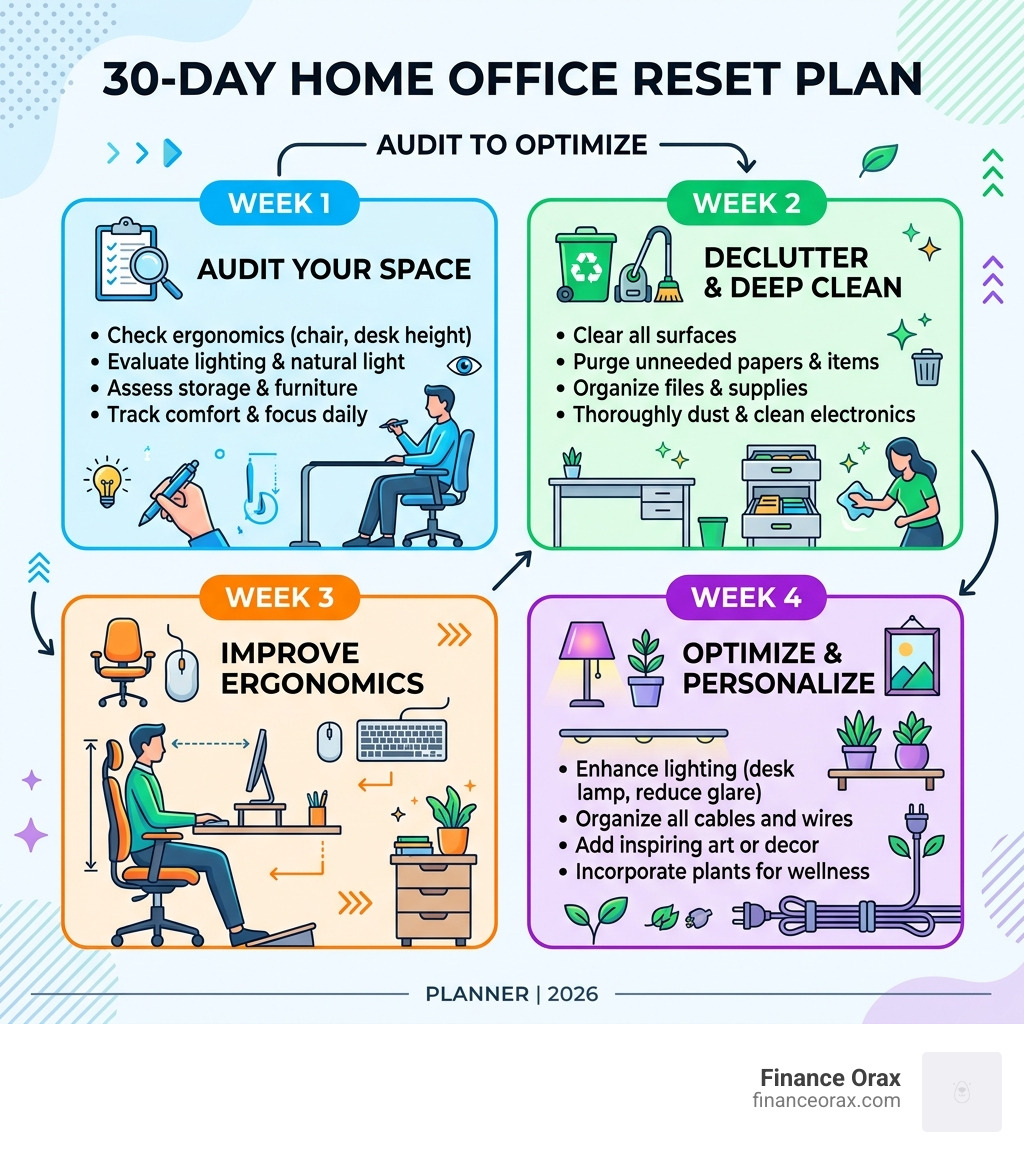
The Core Essentials of a Perfect Home Office Setup
When we talk about building a perfect home office setup, we aren’t just talking about buying expensive gadgets. We are talking about building a “system” for focus. Your workspace is the infrastructure for your career. If that infrastructure is shaky, your work will be too.
The goal is to facilitate “Deep Work”—those periods of intense, undistracted concentration. To do that, your physical environment needs to minimize friction. Every time you have to adjust a wobbly desk or squint at a dark screen, you are leaking cognitive energy.
To help you prioritize your spending, we’ve broken down the gear into tiers. You don’t have to buy everything at once. Start with the “Essentials” and upgrade as your budget allows.
| Gear Category | Budget Tier (~$500) | Mid-Range Tier (~$1,500) | Premium Tier (~$3,000+) |
|---|---|---|---|
| Desk | Fixed-height sturdy desk | Electric standing desk | Designer hardwood sit-stand |
| Chair | Basic mesh ergonomic chair | Refurbished premium chair | High-end designer ergonomic |
| Monitor | 24-inch 1080p display | 27-inch 4K IPS display | Dual 32-inch 4K or Ultrawide |
| Peripherals | Standard wireless set | Mechanical keyboard/MX Mouse | Custom mechanical/High-end |
For a deeper dive into how your physical environment influences your mental state, check out The Home Office Setup Guide for Deep Work.
Choosing the Right Desk for Your Perfect Home Office Setup
Your desk is the “anchor” of your office. In 2026, the gold standard is the electric standing desk. Why? Because humans weren’t meant to sit for eight hours straight. Alternating between sitting and standing keeps your energy levels high and reduces the dreaded afternoon slump.
When choosing a desk, look for these key features:
- Surface Dimensions: We recommend a minimum of 48″ x 24″. If you use dual monitors, aim for 60″ x 30″ to avoid feeling cramped.
- Stability: Cheap standing desks often wobble when fully extended. Look for dual-motor systems and thick steel frames.
- Height Presets: You want a desk that can save your “perfect” sitting and standing heights. If you have to manually adjust it every time, you won’t use the standing feature.
- Cable Trays: A desk with a built-in tray underneath is a lifesaver for keeping wires off the floor.
Ergonomic Seating: The Foundation of a Perfect Home Office Setup
We’ll be blunt: your chair is the most important purchase you will make. You spend 80-85% of your workday sitting. A $40 dining chair is a recipe for a $400 physical therapy bill later.
A truly ergonomic chair should offer:
- Lumbar Support: This should be adjustable to fit the curve of your spine.
- Seat Depth: You should be able to sit all the way back without the seat edge cutting into the back of your knees.
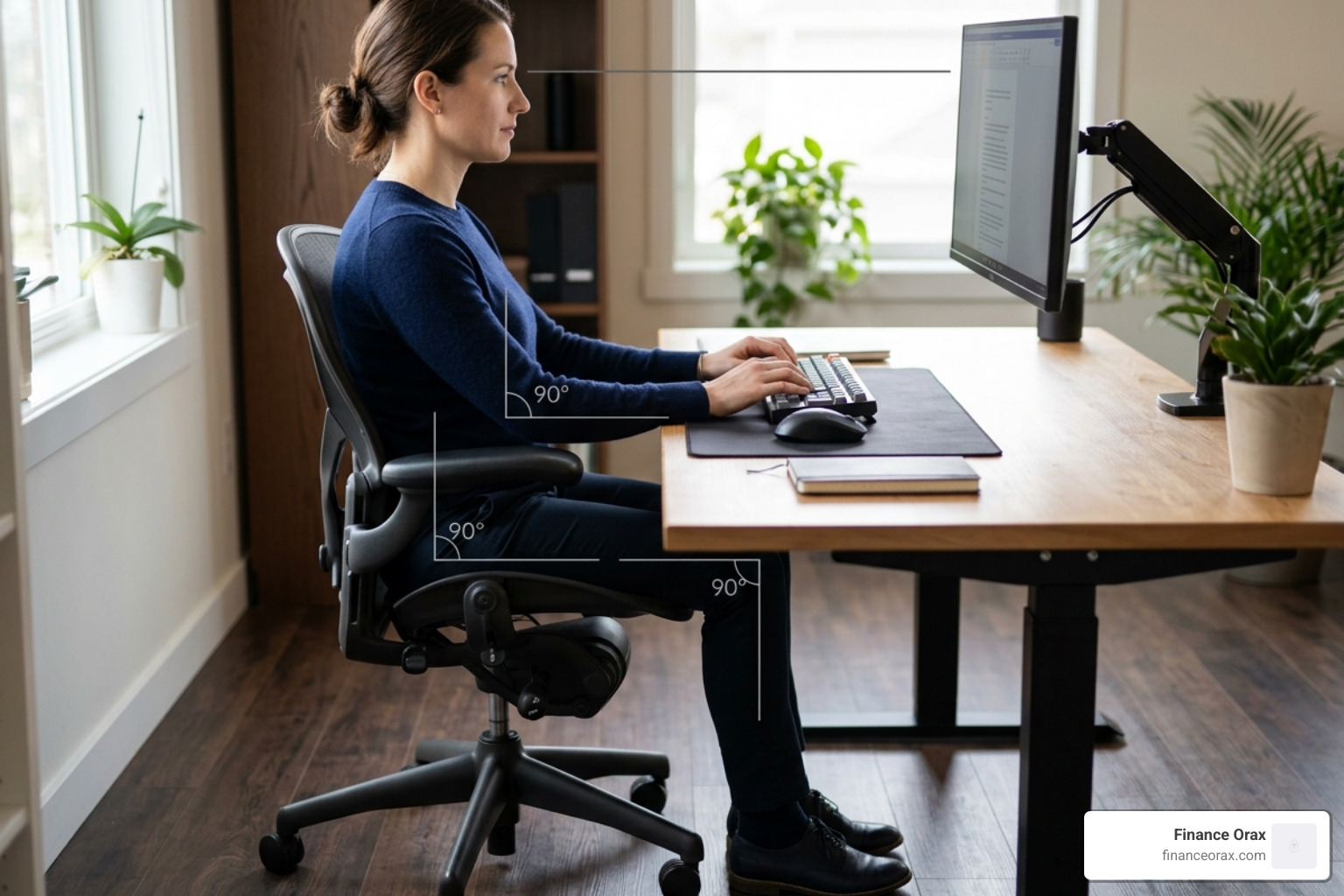
- Adjustable Armrests: Your elbows should rest at a 90-degree angle to prevent shoulder strain.
- Breathability: Mesh backs are great for airflow, while high-quality foam provides better long-term support for heavier users.
The goal is to encourage “micro-movements.” A good chair doesn’t lock you in place; it supports you as you shift throughout the day.
Optimizing Tech and Peripherals for Maximum Output
Once the furniture is set, it’s time to talk about the tools that actually do the work. In our experience, the single biggest productivity jump comes from moving away from a tiny laptop screen.

High-Performance Computing and Connectivity
In 2026, the baseline for a smooth workflow has shifted. With many applications now using local AI, we recommend at least 16GB of RAM for standard office work and 32GB for anyone in creative or data-heavy fields.
- Monitors: A 27-inch 4K monitor is the “sweet spot.” It provides sharp text (crucial for reducing eye strain) and enough screen real estate to have two windows open side-by-side.
- Thunderbolt 5 Docks: If you use a laptop, a Thunderbolt dock allows you to connect your monitor, keyboard, mouse, and charging cable through one single wire. It keeps the desk clean and makes “unplugging” for the day a three-second task.
- Wi-Fi 7: Ensure your router and computer support the latest standards to avoid “screen freeze” during important calls. If possible, a wired Ethernet connection is still the king of reliability.
Audio and Video Excellence for Remote Professionals
How you appear and sound on camera is your “digital handshake.” The built-in webcam on your laptop is usually positioned too low, giving everyone a great view of your chin.
- Webcams: A dedicated 1080p webcam mounted at eye level (on top of your monitor) makes you look significantly more professional.
- Microphones: If you spend a lot of time in meetings, a cardioid USB microphone is a game-changer. It focuses on your voice and ignores background noise like barking dogs or humming air conditioners.
- Lighting: You don’t need a film studio. A simple LED ring light or even facing a window can eliminate the “witness protection program” shadows on your face.
According to scientific research on eye strain, positioning your monitor at arm’s length with the top of the screen at eye level is the best way to prevent neck pain and headaches.
Lighting and Environment: The Silent Productivity Boosters
Lighting is the most underrated part of the perfect home office setup. Most people rely on harsh overhead lights that cause glare and fatigue.
- The 5000K Rule: For daytime work, use “cool” light (5000K-6500K) to promote alertness. In the evening, switch to “warm” light (2700K-3000K) to help your brain wind down for sleep.
- Screen Bars: These clip to the top of your monitor and light up your desk space without reflecting off the screen. It’s a cleaner alternative to a traditional desk lamp.
- Bias Lighting: Placing a small LED strip behind your monitor (bias lighting) reduces the contrast between the bright screen and the dark wall, which is a major cause of eye strain.
Minimalist Organization and Cable Management
Visual clutter equals mental clutter. When your desk is covered in tangled wires and random papers, your brain has to work harder to filter out those distractions.
- The Two-Zone Approach: Keep your “Focus Zone” (arm’s reach) clear of everything except your keyboard, mouse, and a drink. Everything else—printers, reference books, files—goes into the “Support Zone” (drawers or shelves).
- Cable Management: Use Velcro ties instead of plastic zip ties (they are easier to adjust later). Under-desk trays can hide power strips and “bricks,” leaving only one or two clean cables visible.
Personalization and Wellness in the Workspace
At Finance Orax, we believe a workspace should be holistic. It shouldn’t just be a place where you work; it should be a place where you thrive.
We use the “3 Ps” framework for personalization:
- Plants: Indoor plants like Snake Plants or Pothos improve air quality and have been shown to reduce stress levels.
- Pictures: A few meaningful photos can ground you during a stressful day.
- Paintings: Art adds color and personality, making the room feel like a destination rather than a cage.
Don’t forget the small physical supports. A foot rest helps shorter users maintain a 90-degree knee angle, and wrist rests for your keyboard and mouse can prevent carpal tunnel syndrome during long typing sessions.
Frequently Asked Questions about Home Office Gear
How much should I spend on a home office setup in 2026?
A functional, ergonomic setup can be built for as little as $500 if you prioritize a good chair and a basic external monitor. A “pro” setup usually ranges between $1,200 and $1,500. We recommend spending 40% of your budget on your chair, 30% on your monitor, and the rest on your desk and peripherals.
Is a standing desk better than a traditional fixed desk?
Yes, but only if you actually use the standing feature. The benefit isn’t standing all day—it’s the movement. A standing desk allows you to change your posture every hour, which improves circulation and keeps your brain engaged. If a standing desk isn’t in the budget, a fixed desk at the correct ergonomic height is perfectly fine.
How do I reduce eye strain during long work hours?
Follow the 20-20-20 rule: every 20 minutes, look at something 20 feet away for at least 20 seconds. Additionally, ensure your monitor brightness matches the brightness of your room, and use a screen bar or bias lighting to reduce contrast strain.
Conclusion
Building a perfect home office setup isn’t about following a trend; it’s about respecting your body and your craft. At Finance Orax, we see the home office as the ultimate tool for holistic routine-building. When your space is organized, ergonomic, and inspiring, your daily habits follow suit.
Start small. Maybe this week you just raise your monitor on a stack of books to save your neck. Next month, you invest in that ergonomic chair. By treating your workspace as an evolving system, you create a boundary between “home mode” and “work mode” that protects both your productivity and your peace of mind.
For more tips on how to integrate your workspace into a better daily routine, explore our lifestyle services. Your career happens here—make it count.
